Back-of-the-envelope sizing is a quick, rough calculation method for estimating a system’s capacity needs (like requests per second, bandwidth, and storage) to handle expected workloads, balancing both average demand and peak spikes.
Why Capacity Estimation Matters
When designing or scaling a system, engineers use these ballpark estimates to sanity-check that the architecture can meet demand.
In system design interviews and real projects, quantifying expected QPS (queries or requests per second), data bandwidth, and storage needs shows you understand scale and prevents under-provisioning resources.
For example, calculating rough demand can reveal if you need hundreds of servers or just a few and help balance trade-offs (cost vs performance) early in the design.
Capacity planning also forces you to articulate assumptions (e.g. number of users, read/write ratio, data retention), which is critical in both technical and non-technical contexts.
In short, doing the math up front with simplified assumptions helps ensure a system will actually work under load.
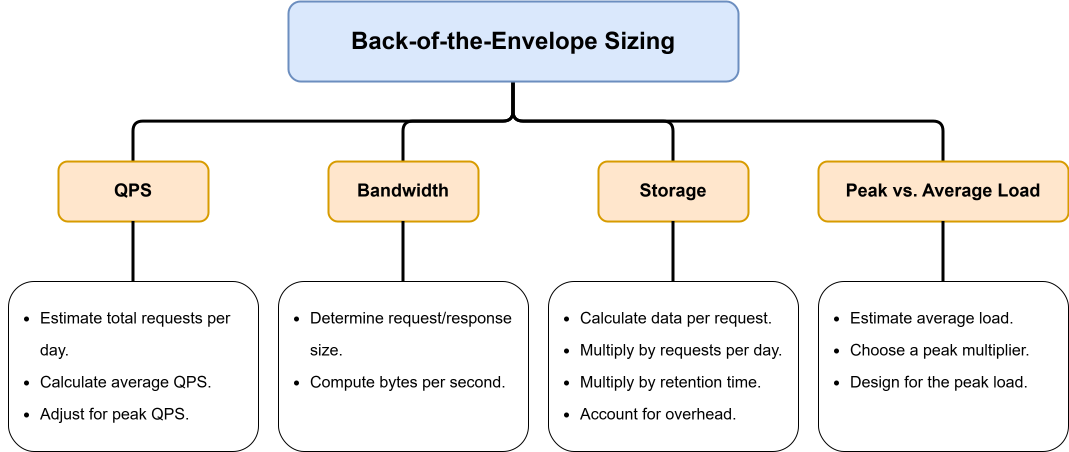 Image scaled to 95%
Estimating QPS (Requests per Second)
Queries per second (QPS) measures how many requests a system handles each second.
A common back-of-envelope approach is:
-
Step 1: Estimate total requests per day (e.g. daily active users × actions per user).
-
Step 2: Compute average QPS ≈ (requests per day) ÷ 86,400 seconds.
-
Step 3: Check read/write mix. If a system is read-heavy, factor reads and writes separately using the read/write ratio.
-
Step 4: Account for peaks by multiplying the average QPS by a safety factor (often 2–3×) to get a peak QPS estimate.
For example, if a news feed has 1 million daily users and each generates 1 request per second during peak usage, you’d size for roughly 1 M QPS.
In practice, 1 million requests per day is only about 12 requests per second on average (1 000 000 ÷ 86 400 ≈ 12 QPS).
If reads outnumber writes, split them, e.g., a 1:100 write:read ratio with 1 million writes/day implies ~12 write QPS and ~1200 read QPS.
Always round up the ballpark figures (e.g. say ~1200 QPS) to ensure a conservative estimate.
Estimating Bandwidth (Network Throughput)
Bandwidth (bytes per second) determines the network capacity needed to handle data in/out of your service.
To estimate:
-
Step 1: Determine the average request/response size (in bytes or KB).
-
Step 2: Multiply by QPS to get bytes per second (e.g. if each response is 1 KB and you have 1000 QPS, that’s ~1 MB/s).
-
Step 3: Or equivalently, compute total data per day and divide by 86,400.
For instance, if 100 million read requests per day each return ~1 KB, that’s ~100 GB/day of data. Dividing by 86,400 seconds gives about 1 MB/s of bandwidth. If writes add another ~10%, you might need ~1.1 MB/s total.
In bullet form:
-
Bandwidth ≈ (Total bytes/day) ÷ 86,400
-
Or: Bandwidth ≈ QPS × (bytes per request).
This rough calculation gives the network throughput (egress or ingress) to plan for peak times. It’s often wise to double or triple the number to allow for bursts or larger payloads.
Estimating Storage Requirements
Storage planning involves estimating how much data the system will accumulate over time.
A back-of-envelope method:
-
Step 1: Calculate data per request (e.g. 1 KB record per write).
-
Step 2: Multiply by total writes per day to get bytes/day.
-
Step 3: Multiply by retention (days or years) to get total bytes stored.
-
Step 4: Add overhead (indexes, metadata) and replication factors.
For example, if the system handles 1 million write requests per day and each record is 1 KB, that’s about 1 GB per day.
Over a year (365 days) that’s ~365 GB, or ~3.65 TB over 10 years.
Adding some extra for indexes and logs, we’d say ~4 TB total.
In another scenario, if each of 1 million users generates 100 KB of data per day (posts, logs, etc.), that’s 100 GB/day or ~36 TB/year.
These ballpark figures guide decisions (e.g. “we need ~50 GB/month of storage for images, so a single database node might suffice at first, with planned sharding later”).
Key formulas in bullet form:
-
Data/day = (writes/day) × (bytes per write).
-
Data (over time) = Data/day × (number of days)
-
Don’t forget replication: e.g. 3× if triplicated.
Peak vs. Average Load
Real-world usage usually varies over time, so peak load (highest demand) can be much higher than the average.
For safe sizing:
-
Estimate average QPS/bandwidth/storage as above.
-
Choose a peak multiplier (often 2×–3×) based on usage patterns or historical data.
-
Design capacity for the peak (or use autoscaling) so the system can handle spikes.
For example, in a Twitter-like app with ~3,500 QPS average, a common rule is to plan for ~7,000 QPS at peak (≈2× average).
In practice, if analytics show 5 PM has 3× the usual traffic, use 3×.
Always state your peak assumptions (e.g. “double the load at peak hours”) so others can assess the margin of safety.
Example Scenario
Consider a social news-feed service that processes around 300 million posts per day (assuming 150 million users, each posting twice).
To estimate system load:
-
Average QPS: 300M requests ÷ 86,400 seconds ≈ 3,500 queries per second (QPS).
-
Peak QPS: Real-world traffic is never uniform, so applying a 2× peak multiplier gives ~7,000 QPS.
Now, if 10% of posts include media averaging 1 MB each, that equals 30 TB of new media uploads per day, or roughly 55 PB over five years.
To handle this at scale, the architecture must ensure the CDN and storage systems can support about 350 MB/s peak ingestion throughput (calculated as 7,000 QPS × 50 KB average response).
Considering metadata, replication, and redundancy overhead, the total long-term storage capacity should be planned for around 60 PB.
This simplified estimation highlights how quick, back-of-the-envelope calculations can help engineers reason about QPS, bandwidth, and storage in the early stages of system design, long before detailed analytics are available.
Key Takeaways
Use simple arithmetic and rounded numbers (e.g. 100,000 seconds/day) for mental math.
Document your assumptions (users, actions, sizes, retention) clearly.
By repeating this practice, you’ll build intuition for capacity needs without needing detailed logs, which is essential for system design prep and scalable architectures.