The match case statement, introduced in Python 3.10 as a structural pattern matching tool, is designed to simplify and enhance readability when dealing with complex conditional logic. It offers a more readable and concise alternative to multiple if...elif...else statements, especially when testing a variable against multiple conditions.
The match statement is similar to the switch case statements found in other languages but is more powerful due to its capabilities for pattern matching.
Syntax of the Match Statement
The match statement allows you to compare a value against several possible matches. Each case can execute a block of code designed for that specific match.
expression: This is the value that you’re comparing against the patterns in eachcase.pattern: These are specific conditions or values that the expression might match. Python checks the patterns in the order they are written._: This is a wildcard pattern that acts as the default case, catching all values that don’t match any previous pattern.
Execution Flow
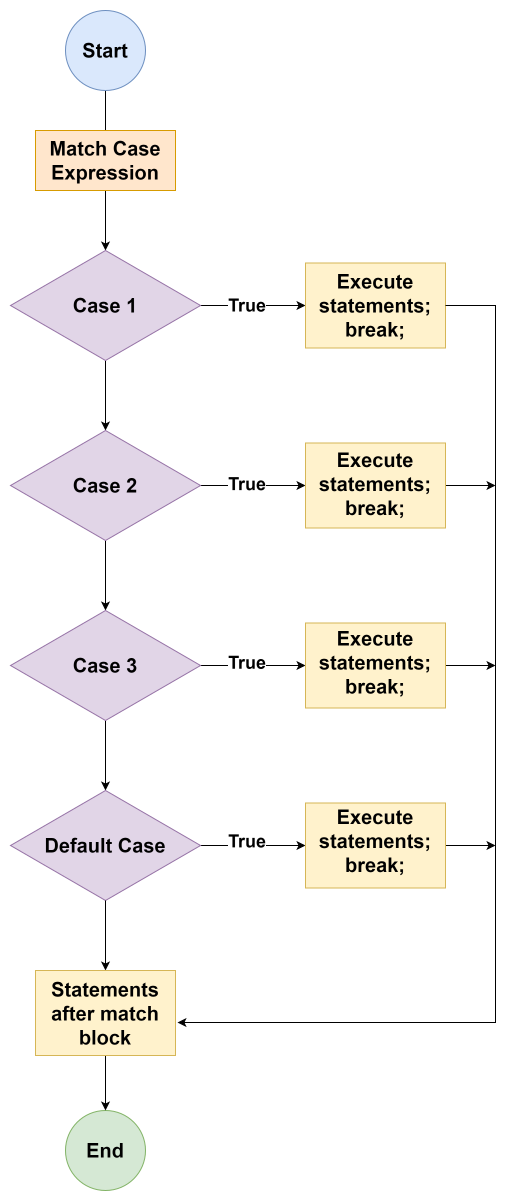 Image scaled to 50%
Example
Explanation:
status_code = 404: Assigns the value404to the variablestatus_code.match status_code: Starts a match statement that will check the value ofstatus_code.case 200: Checks ifstatus_codeequals200. It does not, so it skips to the next case.case 404: Checks ifstatus_codeequals404. It does, so it executes the print statement.- The remaining cases and the default case (
case _) are not executed because a match has already been found.
Combined Cases in Match Statement
In the match statement, you can handle multiple possible values for a single case using the | operator, which functions like an “or” in this context. This is useful when different values should trigger the same response, making your code cleaner and more straightforward.
Example
Explanation:
day = "Tuesday": Assigns the string"Tuesday"to the variableday.match day:: Begins a match statement that evaluates the variableday.case "Monday" | "Friday":: Checks ifdayis either"Monday"or"Friday". If so, executes the associated block.case "Wednesday" | "Tuesday":: Checks ifdayis either"Wednesday"or"Tuesday". If so, executes the associated block.case _:: The wildcard case_catches all other values that haven’t matched any previous cases.
List as the Argument in Match Case Statement
The match statement can also work with lists as arguments, allowing you to match against the contents of a list. This is particularly useful for scenarios where you want to check the structure or presence of certain elements in a list.
Example
Explanation:
colors = ["red", "blue", "green"]: Assigns a list of three colors to the variablecolors.match colors:: Starts the match statement that checks thecolorslist.case ["red", *others]:: Matches if the first element in the list is"red". The*othersis a wildcard that captures the rest of the list, regardless of its contents.case ["blue", *others]:: Matches if the first element is"blue", with*othersagain capturing the rest of the list.case _:: Catches any list that doesn’t start with"red"or"blue".
Using “if” in “Case” Clause
You can incorporate conditions within a case clause using the if keyword to add more specific logic to your matches. This allows for detailed and conditional pattern matching within the match statement.
Example
Explanation:
person = (25, "Engineer"): Assigns a tuple containing an integer and a string toperson.match person:: Initiates a match statement to evaluateperson.case (age, profession) if age > 20 and profession == "Engineer":: Matches ifpersonis a tuple where the first element (age) is greater than 20 and the second element (profession) is"Engineer".case _:: Catches all other values and patterns not matched by the first case.
These explanations and examples provide a thorough look into using the match case statement effectively, illustrating its power and flexibility in handling complex conditional logic in Python.