The if, elif, and else statements in Python are fundamental to controlling the flow of execution based on conditions. These statements allow you to execute specific blocks of code depending on whether certain conditions are true or false.
Below, we’ll break down how to use these constructs effectively across three sections, each focused on a different aspect of conditional execution.
The if Statement
The if statement is used to execute a block of code only if a specified condition is true.
Syntax
condition: This can be any expression that evaluates toTrueorFalse. If the condition isTrue, the code inside the block will execute.
Example
Explanation:
x = 10: Set the variablexto 10.if x > 5: Check ifxis greater than 5.print(...): Sincexis indeed greater than 5, the message “x is greater than 5” is printed to the console.
The else Statement
The else statement complements the if statement and specifies a block of code to be executed if the if condition is false.
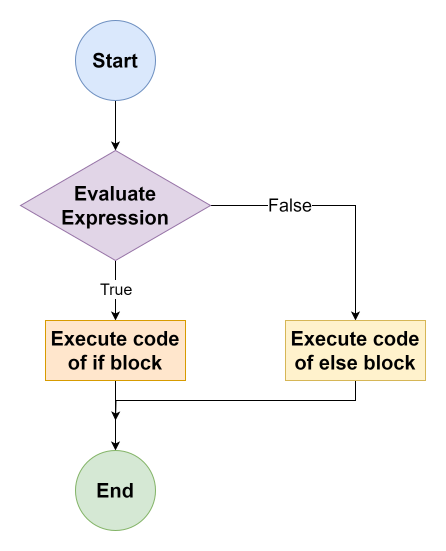 Image scaled to 50%
Syntax
- The
elseblock only executes when theifstatement’s condition evaluates toFalse.
Example
Explanation:
x = 3: Set the variablexto 3.if x > 5: Check ifxis greater than 5.else: Sincexis not greater than 5, theelseblock executes.print(...): Prints “x is not greater than 5”.
The elif Statement
The elif (else if) statement allows you to check multiple expressions for True and execute a block of code as soon as one of the conditions evaluates to True.
Syntax
elifallows for multiple conditions to be checked, each one after the previous one has evaluated toFalse.
Example
Explanation:
x = 15: Set the variablexto 15.if x > 20: Check ifxis greater than 20.elif x > 10: Sincexis not greater than 20 but is greater than 10, execute this block.print(...): Prints “x is greater than 10 but not more than 20”.
This lesson provides a clear, step-by-step guide to using if, elif, and else statements in Python, covering their purposes, syntaxes, and practical examples with detailed explanations.