Arrays in Python are a collection of elements of the same type, stored in contiguous memory locations. Unlike lists, which can store elements of different types, arrays in Python are designed to handle homogeneous data types, making them more efficient for certain types of numerical computations and data storage tasks.
Arrays are particularly useful when dealing with large volumes of data that require performance-sensitive handling. In Python, arrays can be handled using the array module, which provides the necessary functionality to perform operations like traversals, insertions, deletions, searches, and updates efficiently.
Syntax of Array
To work with arrays in Python, you first need to import the array module. Here’s how you can define an array:
'byte_code'is the type code that defines the type of array elements.[ele1, ele2, ele3, ...]represents the array of elements
Understanding Type Codes
When creating an array, the type code is crucial as it directly influences the physical size in memory and the operations allowed on the array. Here is a table summarizing common type codes:
| Type Code | C Type | Python Type | Minimum Size (Bytes) |
|---|---|---|---|
'b' | signed char | int | 1 |
'B' | unsigned char | int | 1 |
'u' | Py_UNICODE | Unicode character | 2 (or 4) |
'h' | signed short | int | 2 |
'H' | unsigned short | int | 2 |
'i' | signed int | int | 2 |
'I' | unsigned int | int | 2 |
'l' | signed long | int | 4 |
'L' | unsigned long | int | 4 |
'f' | float | float | 4 |
'd' | double | float | 8 |
Understanding Array Indexing in Python
Array indexing is a fundamental concept in Python, as it allows you to access, modify, and manipulate elements directly by referring to their position within the array.
Each element in an array is assigned a unique index, which represents its position. These indices start at 0 for the first element and increase by 1 for each subsequent element.
How Array Indexing Works
Here’s a breakdown of how indexing works in arrays and how you can use it to access elements:
-
Positive Indexing: This is the most direct way to reference an element. The index starts at 0 for the first element, 1 for the second element, and so on up to
n-1for the last element, wherenis the number of elements in the array. -
Negative Indexing: Python also supports negative indexing for arrays, which allows you to access elements from the end of the array backwards. Here,
-1refers to the last element,-2to the second last, and so on.
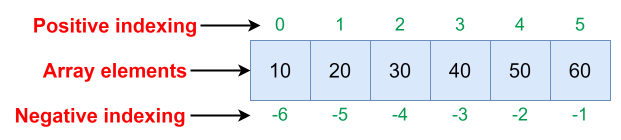 Image scaled to 70%
Example of Array Indexing
Here’s a simple example to illustrate both positive and negative indexing in a Python array:
Explanation:
a[0]anda[1]: These are examples of positive indexing.a[0]accesses the first element (10), anda[1]accesses the second element (20).a[-1]anda[-2]: These illustrate negative indexing.a[-1]accesses the last element (50), anda[-2]accesses the second last element (40).
Traverse - Printing Array Elements
Traversing an array involves accessing each element in sequence and performing an operation such as printing. This is fundamental for displaying the array’s contents or for further processing of its elements.
Example
Here, we will print each element of an integer array.
Explanation:
- import array as arr: Imports the array module and gives it the alias
arrfor ease of use. - a = arr.array(‘i’, [1, 2, 3, 4, 5]): Initializes an array
awith the type code'i', indicating the elements are integers. The array is initialized with the values 1, 2, 3, 4, and 5. - The
forloop: Iterates through each element in the arraya. Theprintfunction outputs each element followed by a space, thanks toend=' ', which overrides the default newline end character.
Insertion - Adding Elements
Insertion involves adding an element at a specific index. This operation shifts subsequent elements to the right, modifying the array’s structure.
Example
In this example, we will insert the number 10 at the second position of the array.
Explanation:
- a.insert(1, 10): Inserts the integer
10at index1. The existing elements from that position onward are shifted right. - a.tolist(): Converts the array to a list for easier reading when printing.
Deletion - Removing Elements
Deletion removes an element at a specified index, which shifts subsequent elements to the left.
Example
In this example, we will remove the element at the second position from the array.
Explanation:
a.pop(1): Removes the element at index1, which is10, from the arraya.- The remaining elements shift left to fill the gap.
Search - Finding Elements
You can search for an element by its value to retrieve its index in the array.
Example
In this example, we will find the index of the element 3 in the array.
Explanation:
- a.index(3): Searches for the first occurrence of the integer
3in the arrayaand returns its index, which is2.
Update - Modifying Elements
Updating an array involves changing the value of an element at a specified index.
Example
In this example, we will change the third element to 20 in the array.
Explanation:
- a[2] = 20: Modifies the element at index
2(originally3) to20. - This operation directly alters the content of the array at the specified index, demonstrating the mutable nature of Python arrays.
These examples comprehensively demonstrate basic operations on arrays in Python, showing how to manipulate array data effectively. These operations form the foundation for working with arrays in applications that require efficient data handling.