Secrets management is the practice of securely storing and handling sensitive information (like passwords, API keys, and tokens) used in software systems to prevent unauthorized access.
Understanding Secrets Management
In modern applications and IT environments, a “secret” refers to any sensitive credential or key that must be kept confidential, examples include database passwords, API tokens, encryption keys, certificates, and SSH keys.
Secrets management encompasses the tools and methods to safeguard these credentials throughout their lifecycle, storing them securely (usually encrypted), controlling who or what can access them, transmitting them safely to applications, and rotating or revoking them when needed.
This practice ensures that only authorized users or services can retrieve secrets, thereby reducing the risk of leaks or breaches.
Why Secrets Management Matters
Without proper secrets management, organizations often suffer from “secret sprawl”; credentials scattered across config files, code, environment variables, and even chat logs.
This sprawl leads to several issues:
-
Security exposure: Long-lived static secrets might get leaked in logs, source repositories, or memory, making them easy targets for attackers. For instance, a hardcoded password in a public code repo or an
.envfile checked into Git can be discovered and exploited. -
Lack of visibility: It’s hard to track who accessed which secret and when if secrets are spread around. No centralized audit trail exists when secrets are unmanaged.
-
Maintenance and rotation challenges: Rotating or updating credentials across multiple services manually is error-prone and time-consuming. A forgotten secret (e.g. an expired password left in a config) can lead to downtime or outages, as in the classic scenario where an expired database password brought down production.
By implementing robust secrets management, teams can centralize secrets storage, enforce access controls (like least privilege), and automate credential updates.
This greatly improves security by limiting secret exposure and ensuring secrets remain up-to-date and monitored.
Common Approaches to Secrets Management
There are various ways to manage secrets, each with different levels of security and complexity.
Here we’ll compare three common approaches: using environment variables, using a Key Management Service (KMS), and using a secrets vault like HashiCorp Vault.
Environment Variables
Environment variables are one of the simplest and most widely used methods to supply secrets to applications.
Developers often load sensitive values (database passwords, API keys, etc.) into the application’s environment at runtime (or via a .env file in development), allowing the code to read those values from memory.
For example, you might set an environment variable DB_PASSWORD="supersecret" on a server or in a container, and the application reads DB_PASSWORD from its environment.
This approach is popular because it’s easy and language-agnostic, no additional tools are required, and nearly every platform supports environment configs.
In fact, many tutorials use environment variables for secrets simply because it’s convenient, not because it’s the most secure practice.
However, there are important drawbacks to relying on environment variables for secrets:
-
Secrets in environment variables are stored in plaintext (in memory or in config files like
.env). They are not encrypted by default, which means if an attacker gains access to the host or process, they can potentially read those secrets. -
Environment secrets are vulnerable to leaks, e.g. they might be accidentally printed in logs or error messages, inherited by child processes, or exposed via debugging interfaces. On Linux, other processes running as the same user can even read your process’s environment variables.
-
No access control or auditing: The operating system doesn’t provide fine-grained access control for individual env vars. Anyone with access to the running machine (or container) who can view environment settings can see all the secrets. There’s also no built-in logging of when secrets were accessed or by whom.
-
Difficult to manage at scale: Rotating a secret stored in env vars means updating it and restarting applications across your infrastructure. In a distributed system, this is error-prone and can lead to downtime. There’s no centralized way to manage multiple environment-specific variants or to ensure all instances have the updated secret.
Pros and Cons of Environment Variables:
-
Pros: Extremely simple to implement and use (no external service needed); works out-of-the-box with applications and container orchestration (just pass the vars); keeps secrets out of code (better than hardcoding).
-
Cons: Not very secure. Secrets are stored in plaintext memory and files; susceptible to leaks via logs or admin access; no native rotation or auditing capabilities; hard to enforce fine-grained access (all or nothing access on a host).
Key Management Services (KMS)
A Key Management Service (KMS) is a cloud (or on-premise) service focused on managing cryptographic keys and performing encryption/decryption operations.
Examples include AWS KMS, Google Cloud KMS, or Azure Key Vault (which, despite the name “Key Vault,” functions as a KMS and secrets store).
Using a KMS for secrets management typically means leveraging strong encryption for your secrets: you encrypt sensitive data using keys stored in the KMS, and only decrypt them at runtime with KMS authorization.
For instance, you might store an encrypted form of your API key in an environment variable or configuration file.
Your application at startup calls the KMS (with proper credentials) to decrypt it.
The idea is that the plaintext secret is never stored at rest, only the ciphertext is, and the encryption keys are safely managed by the KMS.
Cloud KMS systems often use Hardware Security Modules (HSMs) under the hood, adding an extra layer of physical security for key material.
Benefits of KMS approach:
-
Strong encryption: Secrets protected by KMS are encrypted with high-grade algorithms. Even if someone finds an encrypted secret (e.g., in a config file), they cannot read it without access to the KMS key. This mitigates the risk of secret exposure if storage or files are compromised.
-
Managed service (ease of use): KMS is typically a fully managed cloud service, so you don’t have to maintain servers for it. You can be up and running with a cloud KMS quickly since it “just works” as a service. Integration is often straightforward via APIs or SDKs, and cloud providers handle the heavy lifting of availability and security of the key infrastructure.
-
Integration and encryption features: KMS services integrate with other cloud services (for example, AWS KMS integrates with S3, EBS, etc. to encrypt data at rest). They also support features like automatic key rotation, permission management (via IAM roles/policies controlling who can use keys), and audit logs of key usage.
Limitations/considerations:
-
Not a full secret store: A KMS by itself typically doesn’t store arbitrary secret values for you (AWS KMS manages keys, but to store a secret value you’d use AWS Secrets Manager or Parameter Store which use KMS under the hood). In practice, using KMS for secrets means you still need a place to keep the encrypted secrets (in env vars, files, or a separate secrets manager service). KMS will encrypt/decrypt data but won’t handle versioning, dynamic generation, or rich metadata that a dedicated secrets manager would.
-
Granularity of secrets: KMS is ideal for managing a small number of encryption keys rather than thousands of application secrets. If you have many different secrets, you’d end up either using one key to encrypt many secrets or creating many keys. Managing key policies for each secret could become complex.
-
Vendor-specific and limited features: Cloud KMS solutions are often proprietary. They provide encryption and key lifecycle management, but not things like dynamic secrets, secret leasing, or templating. For example, KMS will not generate a database password on the fly or automatically rotate your API token; it can only help encrypt those values. In contrast, more advanced secrets managers can offer those capabilities.
Pros and Cons of KMS:
-
Pros: Secrets stay encrypted (high security at rest); keys are safeguarded by provider (often backed by HSMs); easy to integrate if you’re already in that cloud ecosystem; supports envelope encryption patterns (wrapping data keys with master keys) for robust security. Also provides audit logs and IAM-based access control for key usage.
-
Cons: *Limited scope. KMS primarily manages keys, not the secrets themselves (usually used in tandem with another store or by custom implementation); no built-in dynamic secret features (it won’t create or rotate credentials, only encrypt what you give it); tied to a cloud provider (potential lock-in, though most major clouds have similar services). For many basic needs (just encrypting a few config values), KMS is sufficient, but for more complex secret management across multi-cloud or on-prem systems, it may fall short.
Secrets Vaults (HashiCorp Vault)
HashiCorp Vault (often just called “Vault”) is a popular open-source secrets management tool designed to be a centralized vault for sensitive data.
Vault acts as a secure store where you can keep and tightly control access to secrets like tokens, passwords, certificates, API keys, and more.
Unlike environment variables or a simple KMS, Vault provides a full suite of features purpose-built for secrets management.
Key characteristics of Vault include:
-
Centralized secure storage: Vault encrypts all secrets before storing them (using an internal encryption key which is itself protected by master keys). It acts as a single source of truth for secrets in an organization. Instead of scattering secrets across servers, you store them in Vault and applications ask Vault for the secrets when needed.
-
Strong access control and policies: Vault has a robust authentication and authorization system. Each app or user gets a Vault token with a specific policy that dictates which secrets (or API operations) it can access. This means you can enforce least privilege, for example, an application may only be allowed to retrieve its own database password from Vault, and nothing else. If another service tries to use that token, Vault will deny access. This fine-grained control is a big improvement over environment variables, where any code on the server could potentially read all the env secrets.
-
Dynamic and temporary secrets: Vault can generate secrets on-demand through its various secret engines. For instance, it can create a database user credential dynamically when an application needs to access the database and set it to automatically expire after a short time. These dynamic secrets greatly reduce risk, even if leaked, they soon become invalid. Vault can also auto-rotate certain secrets or revoke them, solving the rotation problem.
-
Audit logging: Every access to Vault can be logged. Vault provides an audit log detailing which token accessed what secret at what time, helping with compliance and forensics.
-
Extensibility: Vault isn’t limited to key-value secrets. It supports a variety of secret engines and use-cases, from static KV storage, to generating SSH certificates, to working as an encryption-as-a-service (via the Transit engine, which can encrypt/decrypt data without storing it). In other words, Vault’s functionality goes beyond just storing secrets, it can handle cryptographic operations and act as a one-stop secrets and encryption solution.
Naturally, Vault’s richness comes with more complexity.
Deploying Vault means running a server (or a cluster of them for high availability ).
You need to initialize and “unseal” the Vault (provide master key shares to unlock it) whenever it starts.
Applications must be configured to authenticate to Vault (via tokens, AppRole, cloud IAM, etc.) and to request the secrets they need. This setup is non-trivial, especially compared to using simple env vars or a cloud service.
Pros and Cons of Vault:
-
Pros: Very feature-rich. Vault supports encryption, dynamic secrets with leasing (time-limited credentials), secret versioning, automatic expiration and rotation, and more. It provides top-notch security: secrets are encrypted at rest and in transit; fine-grained access control ensures each client only sees what it’s permitted to; detailed audit logs track every action. Vault is also cloud-agnostic. It can integrate with multiple clouds and on-prem, making it suitable for hybrid environments. Essentially, Vault offers a one-stop solution for enterprise-grade secrets management and can dramatically reduce secret sprawl by centralizing everything.
-
Cons: Higher setup and maintenance overhead. Vault is software you have to install and manage (unless you use a hosted Vault service). It requires initial expertise to configure correctly, and ongoing care for upgrades, unsealing, backups, etc. Vault’s power can be overkill for small projects. If you only have a few secrets, running a Vault server might not be justified. Also, using Vault introduces a “secret zero” problem: your app needs some initial secret or trust (like a token or IAM role) to authenticate to Vault and retrieve other secrets. Managing that bootstrap secret securely is crucial (though tools like Vault Agent or cloud IAM auth can help).
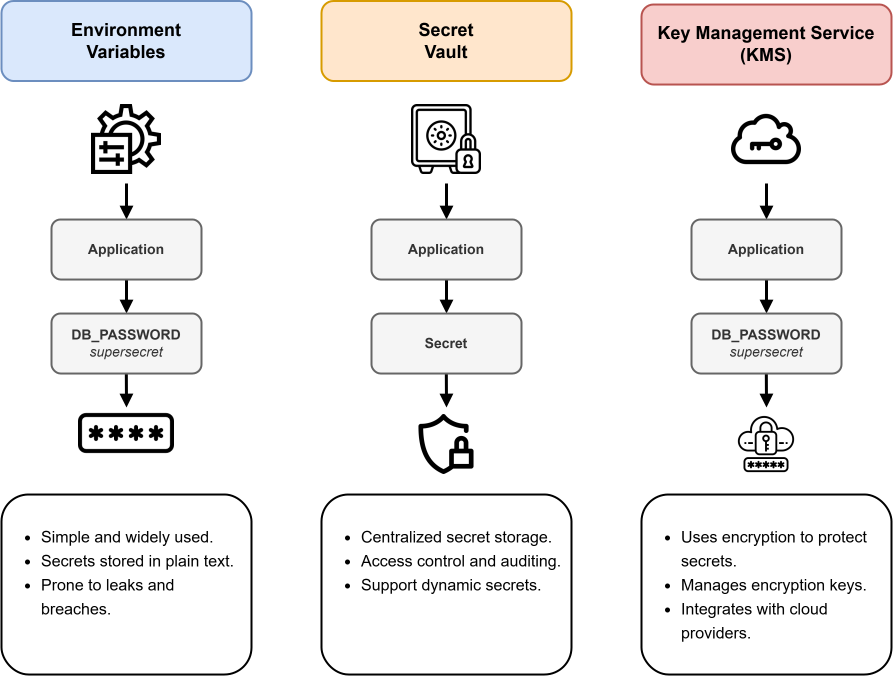 Image scaled to 95%
Environment Variables vs KMS vs Vault: Key Differences
Each approach to secrets management strikes a different balance between simplicity, security, and functionality.
Below is a comparison of environment variables, KMS, and Vault across various dimensions:
-
Security & Access Control: Environment variables are basic. Secrets are in plaintext and rely on OS permissions (if an attacker or rogue user can access the machine or process, they can read the secret). KMS improves security by storing the keys in a secure service (often backed by hardware modules) and only releasing secrets in encrypted form or after proper authentication. Vault takes it further by encrypting secrets at rest and enforcing access control policies for every secret request. Unlike env vars which expose everything to the host, Vault will only give out the secrets a client is allowed to get. Vault and KMS also produce audit logs (who accessed which key/secret), whereas env vars have no inherent auditing.
-
Ease of Use vs. Complexity: Environment variables are the easiest. No extra infrastructure, just set them and go. KMS (cloud-based) is also relatively easy to use via APIs/SDKs and is maintained by the provider (no servers to manage). Vault is the most complex: you must deploy and maintain it, and applications need integration logic to communicate with Vault. For a small app or during early development, environment vars might be sufficient. If you’re already on a cloud platform, using its KMS or secret manager involves moderate effort. Vault requires the highest initial investment in setup and learning curve, but it pays off in larger, security-critical environments (e.g., many microservices, strict compliance requirements).
-
Features & Capabilities: Environment variables have minimal features (no built-in encryption, rotation, etc. They’re just a storage mechanism provided by the OS). KMS provides encryption and key management; for example, you can easily encrypt data and manage keys (with rotation policies for keys themselves). Some cloud KMS come with companion secret stores (like AWS Secrets Manager or Azure Key Vault) that add features like secret rotation, versioning, and secure storage using the KMS keys. HashiCorp Vault offers the richest feature set: from dynamic secret generation (temporary database or cloud credentials) to acting as a Certificate Authority, to providing encryption as a service. Vault essentially combines the capabilities of a secrets manager and a KMS (transit engine) in one. It also supports leasing/TTL on secrets, automated revocation, namespacing, and more features that neither plain env vars nor basic KMS provide.
-
Use Cases: Using environment variables is acceptable for development, testing, or very simple deployments where security risks are low and convenience is needed (also better than hardcoding secrets in code). KMS is great when you need to protect secrets with strong encryption, especially in a cloud-centric application, for example, encrypting database credentials or API keys that your app will decrypt at runtime. It shines in scenarios like encrypting data fields (PII) or disks, where you want centralized key control. Vault is the go-to for complex or high-security environments. Think organizations with many applications and secrets, multi-cloud architectures, or compliance requirements. If you need features like automatic secret rotation, one-time-use credentials, detailed audits, or a single secret store across cloud and on-prem, Vault is often the best choice. Vault can also replace or integrate with cloud-specific solutions, which is useful if you want to avoid being tied to one vendor.