Safe patterns for online schema changes involve strategies (like the expand-and-contract approach) to update a database schema without downtime by making incremental, backward-compatible changes, whereas offline migrations rely on taking the system offline during a maintenance window to apply schema updates in one big batch.
Understanding Schema Changes and Migrations
A database schema change means altering the structure of a database . For example, adding or removing a column, changing a data type, or splitting a table.
A migration is the process of applying those schema changes (and often moving or transforming data to fit the new structure).
Broadly, there are two ways to perform migrations:
-
Offline migrations (big-bang changes): The application is taken offline (not serving users) while the database schema is updated all at once. This typically involves scheduled downtime or maintenance periods.
-
Online schema changes (zero-downtime migrations): The database schema is changed while the system stays online, serving users. This requires extra care to avoid breaking the running application and usually involves doing the migration in phases that maintain compatibility.
Understanding the difference is important because choosing the wrong approach can lead to downtime, lost data, or application errors.
Next, we’ll explore safe patterns for each approach and how to execute schema changes reliably.
Offline Migrations (Big-Bang Approach)
Offline migration is the simplest way to change a schema: stop the application, apply all changes, then restart the application with the new schema.
Many small applications or early-stage projects use this approach because it’s straightforward.
For example, if you need to add an index or column, you might put the site into maintenance mode at midnight, run the database updates, and bring it back up when done.
This “stop-the-world” style deployment is often planned via maintenance windows (those banners announcing “The site will be down for maintenance from 1–2 AM” are a result of offline migrations).
Safe Patterns for Offline Migrations
Even though offline migrations are simpler, there are still best practices to ensure safety and quick recovery:
-
Plan and test ahead: Because the change happens all at once, test the migration script in a staging environment. Make sure the new code (that uses the new schema) and the migration scripts have been validated.
-
Backup data: Always take a backup before running a big schema change. This way, if something goes wrong, you can restore the data.
-
Keep it as short as possible: Optimize the migration steps to minimize downtime. For instance, if adding an index will lock a table for a long time, consider techniques to reduce lock time or do partial work beforehand.
-
Have a rollback plan: If the new code or schema has an unexpected bug, you might need to revert quickly. Rolling back an offline migration can be hard, especially if the database changed in ways the old code doesn’t understand. In practice, rollback might mean restoring the backup and restarting the old version of the app, which is time-consuming. So, double-check everything to avoid this scenario.
Example Scenario (offline)
Imagine a small e-commerce site that needs to change a column’s data type.
The team schedules maintenance at midnight.
They shut down the site, run a script to alter the column type and convert existing data, then start the site again. This big-bang deployment works because no users are on the system during the change.
However, if the migration fails halfway or the new code has a bug, the site must remain down until issues are fixed and illustrating why offline migrations are risky if not thoroughly planned.
Offline migrations are viable when downtime is acceptable (e.g., an internal app or a small user base during off-hours). They are relatively easy to implement and understand.
However, as systems grow, taking downtime becomes less acceptable and more disruptive. This is where online approaches become crucial.
Online Schema Changes (Zero-Downtime Migrations)
An online migration updates the schema without taking the application down. The application continues serving requests while the database changes happen in the background.
This approach is essential for applications that require high availability (think of global services that can’t go offline).
The challenge is that old application code and new database schema must coexist temporarily without errors.
In other words, the changes must be done in a backward-compatible way so that both the “old” and “new” versions of the application see what they expect in the data.
Performing schema changes live is trickier than offline because you have to account for mixed states.
For example, if you add a column or split a table, the running code might not yet know about the new structure.
The new version of the code expects the new schema, while the old version (still running on some servers) expects the old schema. To handle this, developers use safe patterns that phase the changes.
One common analogy is replacing the legs of a table: an offline migration is like taking the table out of service and swapping all its legs at once; an online migration is like replacing the legs one by one while the table is still holding up. It’s doable with care, but you must ensure the table (system) never collapses.
The Expand-and-Contract Pattern
The most widely used safe pattern for online schema changes is called expand/contract (also known as parallel change or double-buffering).
This multi-step strategy ensures the system remains operational throughout by gradually expanding support to a new schema and then contracting (removing) the old schema once it’s no longer needed.
At a high level, the steps are:
-
Expand the schema: Introduce the new schema changes alongside the old schema. For example, if you need to rename or split a column, add new columns or tables for the new format without dropping the old ones. Ensure these additions don’t conflict with existing usage (make new columns nullable or with default values so that old code isn’t disturbed).
-
Dual-write (update application to use both schemas): Deploy application code that writes to both the old and new schema structures for any new data, while still reading from the old schema. This means every time a write (insert/update) happens, the data is duplicated into the new column/table as well as the old one. The app still uses the old schema for reads, so users see no change in behavior. This step is often controlled by feature flags or configuration toggles, so it can be rolled out gradually. (At this point, new data is populating both schemas, but old data is only in the old schema.)
-
Backfill/migrate existing data: In the background, run a migration script or job to copy all the historical data from the old schema to the new schema format. This might involve transforming data (e.g. splitting a full name into first and last name fields, converting a boolean to an enum, etc.), so do it carefully and verify the results. After this step, the new schema has all the data it needs; both new and old records are present in the new structure.
-
Verify and test: With writes going to both schemas and all data backfilled, you should test the new schema in read mode. For example, run the new code in staging or on a subset of traffic (using feature flags) to ensure it can read from the new schema and function correctly. This step gives confidence before the final switch.
-
Switch reads to the new schema: Update the application (or flip a feature flag) so that it now reads from the new schema instead of the old. At this point, the application is primarily using the new schema for both reads and (still) writes. However, to be extra safe, the application might continue dual-writing to the old schema for a bit longer, just in case you need to roll back. In practice, this switchover can be done gradually (e.g. one service or one region at a time) to catch any issues early.
-
Stop writing to old schema: Once you’re confident the new schema is working well for reads and writes, update the app to write only to the new schema (disable the dual-write). The old schema is now obsolete. It’s no longer being read or written.
-
Contract the schema (remove old parts): Finally, safely drop the old columns or tables that are no longer used. This cleanup should be done only after you verify no code is referencing the old schema. At this point, the migration is complete: the system is fully on the new schema with zero downtime during the whole process.
This expand/contract model guarantees that at all times during the migration, the application remains compatible with the database, avoiding errors or downtime.
If something goes wrong halfway, you can roll back the application code to the previous version without losing data, because the old schema is still intact and was still getting writes.
In other words, each step is backward-compatible, allowing safe reversal if needed.
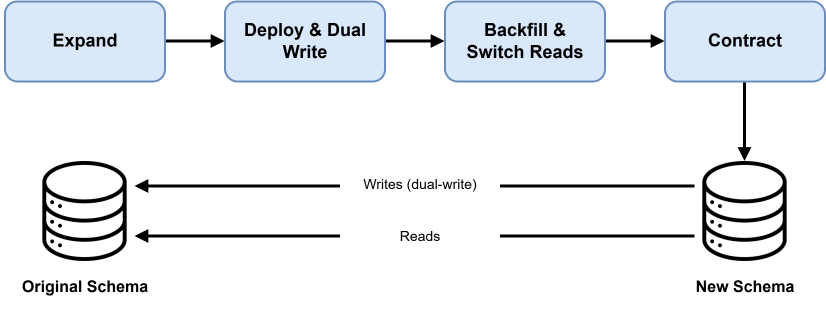 Image scaled to 75%
In the diagram above, during an online migration the application (client) is writing to both the original schema and the new schema in parallel (dual writes) while still reading from the original schema. This ensures all new data is captured in both places, preparing the system to switch over to the new schema once backfilling is complete.
Additional Best Practices for Online Changes
When doing zero-downtime migrations, developers often use techniques to manage the complexity:
-
Backward compatibility in code: Design your application updates so that the old code works with the new schema, and the new code works with the old schema. For instance, if a new field is added, deploy it as optional or with a default so old code ignores it without failing. Only start relying on the new field after it’s present everywhere.
-
Feature flags & staged rollout: Feature flags can control whether the application writes to the new schema or reads from it. This allows a gradual rollout of the new schema usage and an easy “toggle off” if issues arise.
-
Avoid destructive changes until the end: Do not drop or rename columns until you are sure nothing is using them. It’s safer to add new things (columns, tables) rather than change or remove existing ones in the middle of a migration. Once the migration is finished and confirmed, then remove the old schema objects.
-
Monitor and double-check data consistency: During dual-writing, ensure that both old and new schema are receiving the same data. After backfill, confirm that the new schema’s data matches the old schema’s. Any discrepancy should be fixed before switching reads to the new schema.
-
Small, incremental changes: Try to break big schema changes into smaller steps if possible. Smaller changes (like adding one column at a time) are easier to manage and verify than a massive change touching many tables. This incremental approach is “safer for the whole system” and reduces risk.
Example Scenario (Online)
Suppose we need to split a user’s full name stored in one column name into two columns: first_name and last_name.
Doing this as an online migration, we would:
-
Expand: Add two new columns
first_nameandlast_nameto the users table, but keep the oldnamecolumn too (we don’t remove it yet). Both new columns are nullable (or have defaults) so existing writes that only usenamewon’t break. -
Deploy a new version of the app that on each user update, it writes to both
nameand the new columns. For now, reads still use the oldnameto display names, so users see no change. -
Backfill existing data: run a script to parse each
nameinto first and last name and fill the new columns. For names where the split is ambiguous, you might use some rules or fallback (this requires careful handling, as the Prisma guide notes in the case of complex names). -
After backfilling, test the new reading logic: switch the app (perhaps for a test cohort of users) to read
first_name+last_nameinstead ofname. Verify that names appear correctly. -
Cut over all reads to the new columns once confident. The app now uses
first_name/last_namefor displaying names. Writes might still double-write tonamejust to be safe. -
Finally, update the app to stop writing the old
namefield (now all writes use onlyfirst_nameandlast_name), and then remove thenamecolumn from the database. The schema change is complete with zero downtime – at no point did we have to lock the table in a way that users noticed, nor did we break any running queries.
This approach took more steps than an offline “just change the column” migration, but it kept the system running without errors.
If any bug was discovered after step 3, we could have rolled back the app to use the old name column exclusively again (since it was still being maintained), avoiding a crisis.
The expand-and-contract pattern allowed a seamless schema evolution.
Choosing Online vs. Offline – Key Differences and Trade-offs
Both offline and online migration strategies aim to apply schema changes safely, but they differ in trade-offs:
-
Downtime: Offline migrations require downtime – the application is unavailable to users while changes are applied. Online migrations strive for zero downtime, which is essential for services that need to be available 24/7.
-
Complexity: The offline approach is simpler to implement (fewer moving parts, just do it in one go). Online migrations are more complex, requiring careful planning, multiple deployment steps, and often additional code to handle dual schemas. They can take days or weeks of effort for a single change in a large system.
-
Risk and Rollback: Offline big-bang changes concentrate all the risk in one event – if something goes wrong, you’re under pressure to fix it quickly or roll everything back, potentially including reversing data changes. This can be stressful and error-prone. Online changes spread the risk across stages: if a step fails, you can usually pause or revert to the previous state without immediate user impact. This makes online migrations safer in the long run, despite their complexity.
-
When to use what: If you have a small application or a window where downtime is acceptable, an offline migration might be perfectly fine – it’s quick and all-or-nothing. However, if you run a large-scale application or cannot afford to be down (e.g., a global service or an application used around the clock), you must use online migration patterns to avoid disrupting users. In fact, at scale, some schema changes (like altering huge tables) cannot be done quickly and would timeout if attempted in one go, so doing them online/asynchronously is the only practical option.
Many teams adopt a hybrid approach: use offline migrations in the early stages of a project or for non-critical updates, but move to online, safe-by-design migrations as the cost of downtime grows.
The key is to always ensure backward compatibility and have a rollback plan regardless of approach.