TCP, UDP, and QUIC are network transport protocols that differ in reliability and speed: TCP is reliable and connection-oriented, UDP is fast but connectionless (no delivery guarantees), and QUIC runs on UDP to offer fast, secure connections with TCP-like reliability.
Below, we break down what each protocol is, how they differ, and scenarios for using each.
Transmission Control Protocol (TCP)
TCP (Transmission Control Protocol) is a widely-used transport layer protocol known for its reliability and ordered delivery.
It is connection-oriented, meaning it establishes a connection between sender and receiver before transmitting data.
Every byte sent is tracked and acknowledged, and if any data packet is lost or arrives out of order, TCP will retransmit and reorder packets to ensure the application receives everything correctly.
This guarantees error-free, in-sequence delivery of data (critical for applications like web pages and file transfers).
TCP requires a 3-way handshake to establish a connection: the client sends a SYN packet, the server responds with a SYN-ACK, and the client sends an ACK to confirm. Only after this handshake do they start exchanging data, ensuring both sides are ready and agree on sequence numbers for reliable communication.
Because of these features, TCP is slightly slower to start communication and adds overhead.
However, it’s the backbone of most internet applications that need accuracy over speed.
For example, when you load a website or download a file, TCP ensures all the HTML, scripts, and bytes arrive intact and in order. If a piece is missing or corrupt, TCP will resend it.
This reliability is why TCP is used for web browsing (HTTP/1.1 and HTTP/2), email, file transfers, and financial transactions where missing or incorrect data could cause problems.
User Datagram Protocol (UDP)
UDP (User Datagram Protocol) is a simpler, connectionless transport protocol. It does not set up a dedicated connection or perform handshakes before sending data.
UDP simply sends packets called “datagrams” to the recipient, without checking if they arrive or in what order.
This means UDP has minimal overhead and latency. No waiting for connection setup or acknowledgments, resulting in very fast transmission at the cost of reliability.
In UDP, packets might get lost, arrive out of sequence, or get corrupted, and UDP won’t automatically fix that.
The protocol is often described as “fire-and-forget”.
This makes UDP ideal for applications where speed and low latency are more important than perfect delivery.
Imagine a live video stream or online game: a slight delay or waiting to retransmit lost packets would harm the experience more than an occasional dropped frame or missed update.
For example, video conferencing and online gaming prefer UDP because they need instant, real-time communication. If a few data packets drop, the call or game can continue with perhaps a minor glitch, but no significant disruption.
Similarly, live video streaming (e.g. Twitch, YouTube Live) uses UDP so that the stream stays smooth; viewers generally prefer a continuous stream over a perfectly lossless one
UDP’s lightweight design also makes it suitable for simple query-response tasks like DNS lookups, where a quick request/response is needed with minimal overhead.
If a DNS packet is lost, the application can just retry quickly, rather than incurring the cost of a TCP connection.
Another unique aspect of UDP is that, unlike TCP, it supports multicast and broadcast transmission, sending data to multiple recipients at once because it doesn’t require a one-to-one connection. (TCP is strictly one-to-one, so it cannot broadcast or multicast data in the same way.)
However, because UDP doesn’t guarantee delivery, it’s unsuitable for applications that require reliability (e.g. file downloads or database communications would get corrupted data).
In summary, UDP trades off reliability for speed and is used when a bit of data loss is acceptable but low latency is critical.
Quick UDP Internet Connections (QUIC)
QUIC (Quick UDP Internet Connections) is a modern transport protocol designed to combine the best of TCP and UDP.
Developed by Google and now adopted as the basis for HTTP/3, QUIC runs on top of UDP but adds TCP-like features such as reliable, ordered delivery and congestion control, all while aiming to reduce latency and improve security.
In simple terms, QUIC is like a next-generation TCP implemented over UDP. It provides a reliable, stream-based data transfer similar to TCP, but with UDP’s agility and speed, plus built-in encryption by default.
One of QUIC’s big advantages is how it handles connection setup. QUIC’s handshake is faster than TCP’s.
In fact, QUIC integrates the transport handshake and TLS encryption negotiation into a single step, allowing new connections with 0-RTT (zero round-trip time) setup in some cases.
This means a QUIC client can start sending data almost immediately, without the multi-step back-and-forth that TCP requires for connection and TLS setup.
The result is lower latency, which is especially beneficial for web pages and API calls. Your browser can start loading HTTP/3 content via QUIC without the usual delay of TCP handshakes.
Beyond speed, QUIC incorporates encryption and security by default.
All QUIC packets are encrypted (equivalent to always-on TLS 1.3), so any data sent via QUIC is secure out of the box.
There’s no option for an unencrypted QUIC stream, which improves privacy and prevents network interference in ways TCP can’t (since TCP headers for handshake are unencrypted).
QUIC also supports multiplexing multiple streams within a single connection.
This means an application can send parallel streams of data that won’t block each other.
In TCP, if you try to multiplex (like HTTP/2 does over one TCP connection), all streams can get stalled by one lost packet (a problem called head-of-line blocking).
QUIC avoids this by handling streams independently; a lost packet affects only its particular stream, not the others. This leads to more efficient use of the connection, especially for web pages loading many assets simultaneously.
Another notable feature is QUIC’s ability to handle network changes gracefully.
Each QUIC connection is identified by an ID that is not tied to your IP address or port, which allows connection migration.
For example, if you are on a mobile device using a QUIC connection and you switch from Wi-Fi to cellular data, QUIC can maintain the session without forcing a reconnection, because the connection ID stays the same even as IP/port changes are detected.
This is a big improvement over TCP, which would break the connection if the network path changes. This mobility resilience makes QUIC attractive for mobile applications where users frequently change networks.
In summary, QUIC is a UDP-based, secure, and agile protocol that provides reliability akin to TCP. It was designed to reduce web latency and improve throughput on modern networks (particularly for encrypted web traffic).
Major tech companies have adopted QUIC: for instance, when you use Google services like YouTube or Search, your traffic often uses QUIC under the hood to speed up delivery.
In fact, HTTP/3 (the latest HTTP version) uses QUIC by default, so browsers and websites that support HTTP/3 are leveraging QUIC to load pages faster and more reliably on shaky networks.
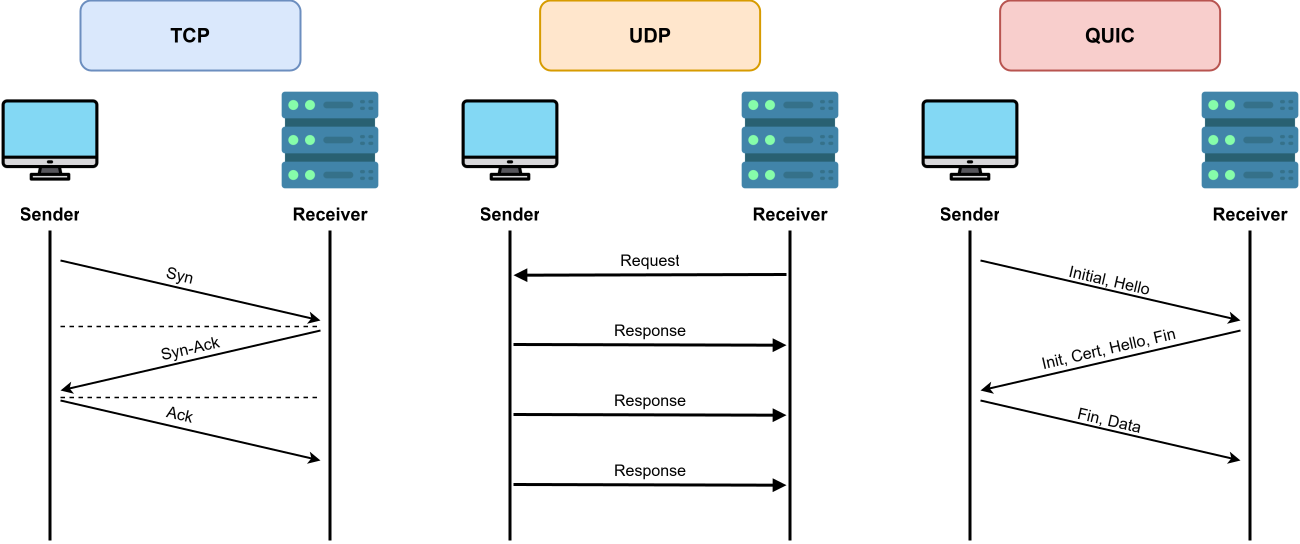
Key Differences: TCP vs UDP vs QUIC
To summarize the core differences between these three protocols, here’s an overview of how they compare on important aspects:
-
Connection Setup: TCP is connection-oriented and requires a 3-way handshake (SYN, SYN-ACK, ACK) before any data flows. UDP is connectionless. It sends data without any handshake, which means zero setup delay. QUIC, despite providing connections, has a much faster setup; it combines transport and encryption handshake so data can often begin flowing in the first round trip (and even 0-RTT on repeat connections).
-
Reliability & Ordering: TCP guarantees reliable delivery and in-order packet sequencing. Lost packets are retransmitted and all data is reassembled in the correct order for the application. UDP provides no reliability; packets might be lost or arrive out of order, and UDP itself won’t resend or reorder them. QUIC also provides reliable, ordered delivery (much like TCP) on a per-stream basis, retransmitting lost data, but it achieves this at the user level over UDP. Thus, TCP and QUIC ensure what you send is what the receiver gets (or you get an error if not), whereas UDP just blasts packets and doesn’t check again.
-
Speed & Latency: Because of its handshakes and acknowledgments, TCP introduces more latency. There’s an initial delay to establish connection and slight delays if it waits for packet ACKs during transfer. UDP has the lowest latency since it doesn’t wait for anything; it’s great for time-sensitive data where a quick send matters more than confirming delivery. QUIC aims to be low-latency like UDP. Its optimized handshake and lack of kernel overhead mean faster startup and no head-of-line blocking, so data gets delivered with minimal delay (even improving on TCP in many cases, especially for short bursts of data). In practice, QUIC can often match or beat TCP’s performance for web traffic due to these optimizations.
-
Bandwidth & Congestion: All three handle network congestion, but they do it differently. TCP has a well-established congestion control (additive increase, slow start, etc.), tuned over decades. UDP by itself does not do congestion control or flow control. It will send as fast as the application dictates, which can overwhelm a network (often applications using UDP implement their own rate control if needed). QUIC includes its own congestion control algorithms, similar in purpose to TCP’s but designed to be more flexible and to recover faster on modern networks (and since QUIC runs in user space, these algorithms can evolve without OS kernel updates). For a developer, this means TCP and QUIC will automatically slow down if the network is congested, whereas UDP will not; you’d have to handle that at the application level.
-
Security: TCP itself doesn’t encrypt traffic. Security for TCP comes from adding TLS (Transport Layer Security) on top of it (e.g. HTTPS uses TLS over TCP). UDP also has no built-in encryption; if needed, one can use DTLS (Datagram TLS) or an application-level encryption. QUIC, on the other hand, has built-in encryption equivalent to TLS 1.3 for every connection. QUIC encrypts most of its header and payload, providing confidentiality and integrity automatically. This means less hassle to secure communications and protection against eavesdropping or tampering by default on QUIC.
-
Multiplexing & Streams: TCP provides a single byte-stream per connection. If you want multiple logical streams, either you open multiple TCP connections or multiplex within one (which can cause head-of-line blocking as mentioned). UDP sends independent packets; the concept of streams has to be handled by the application if needed. QUIC natively supports multiple streams within one connection, allowing parallel transfers without interference. For example, a web page can fetch several resources over one QUIC connection, and a delay in one doesn’t stall the others, something not possible with a single TCP connection due to its strict ordering.
-
Use of Ports and NAT: All three use port numbers to identify applications (QUIC uses UDP ports). However, TCP connections are identified by the 4-tuple (source IP, source port, dest IP, dest port), so if any of those changes, the connection breaks. UDP is similar for individual datagrams but since there’s no stateful connection, applications just send to a new IP/port as needed. QUIC introduces a Connection ID that stays constant even if the underlying IP or port changes, enabling connection migration as discussed (helpful through NAT rebinding or network switch). Additionally, QUIC’s use of UDP often allows it to traverse NAT devices more easily (appearing as UDP traffic), and because its headers are encrypted, middleboxes are less likely to interfere with QUIC streams.
-
Maturity & Support: TCP and UDP are very mature (decades-old, universally supported in all operating systems, devices, and networks). QUIC is newer. It was standardized by IETF in 2021 and is rapidly gaining adoption (mainly via HTTP/3 in browsers and web servers). Modern systems and networks generally support QUIC, but it operates in user-space libraries (e.g. Google’s quiche or Cloudflare’s quiche library) rather than the OS kernel. As a developer, using QUIC might involve using specific libraries or frameworks, whereas TCP/UDP sockets are built into the OS. Over time, QUIC is expected to become as common as TCP for many uses, but it’s still evolving.
In essence, TCP vs UDP vs QUIC can be seen as a trade-off triangle between reliability, speed, and modern features. TCP gives you tried-and-true reliability, UDP gives you raw speed, and QUIC strives to give you both speed and reliability (with some new capabilities) by building on UDP.
Choosing the Right Protocol: When to Use TCP, UDP, or QUIC
Choosing between TCP, UDP, and QUIC depends on the needs of your application. Each protocol shines in different scenarios.
Here are some guidelines and examples for when you should use each:
-
Use TCP when you need reliable, ordered delivery and cannot tolerate data loss. If accuracy is more important than speed, TCP is the go-to. Typical use cases:
-
Web pages and file downloads: Browsers loading HTML/CSS/JS, or users downloading files, rely on TCP so that every byte arrives intact – a missing packet could break a webpage or corrupt a file.
-
Email and messaging services: Protocols like SMTP/IMAP use TCP to ensure your emails or messages arrive complete. You wouldn’t want parts of an email or chat message missing.
-
Financial transactions and critical data: Banking apps, e-commerce payments, or any system where data integrity is paramount use TCP to avoid loss or errors. The overhead is worth it to prevent mistakes.
-
General client-server APIs: If you’re designing a request/response API where each request must reliably get a full response, TCP (often with TLS) is usually the default choice because it simplifies handling retries and ordering.
-
-
Use UDP when you need fast, lightweight communication and can tolerate some data loss or variability in order. UDP is ideal if low latency is key and the application or user can tolerate occasional dropped packets:
-
Live streaming and real-time media: For live video or audio (streaming, conferencing), UDP minimizes delay so that there’s no buffering or lag in conversation. A few lost frames or a slight drop in quality is acceptable to keep the stream smooth.
-
Online gaming: Games often use UDP for transmitting player actions and state. Speed is crucial. You want the lowest ping. If a single UDP packet with a state update is lost, the next update will correct the state anyway, so the game continues seamlessly rather than freezing up.
-
Voice over IP (VoIP): Voice calls (e.g. Skype, Zoom audio) use UDP so that speech flows naturally. It’s better for a tiny bit of audio to drop than to introduce delay from resending packets.
-
DNS queries and small queries: UDP is used by DNS because the queries are short. It’s faster to send a DNS request via UDP and maybe retry on timeout than to do the overhead of a TCP connection for each lookup.
-
Broadcast/multicast situations: If you need to send data to many recipients at once (e.g. LAN discovery protocols, certain IoT use cases, or streaming to multiple subscribers on a local network), UDP is typically used because it supports multicast/broadcast, whereas TCP/QUIC would require separate connections to each recipient.
-
-
Use QUIC when you want the benefits of TCP’s reliability but with better performance, especially in modern web or mobile environments:
-
HTTP/3 and Web Services: If you are building or using a web application that supports HTTP/3, you’re inherently using QUIC. This is beneficial for websites and APIs that need to load quickly. QUIC is great here because it reduces handshake time and improves page load times on high-latency or lossy networks (like mobile networks). For instance, Google and Facebook have widely adopted QUIC to speed up content delivery to users.
-
Mobile apps with changing networks: For apps where users might switch networks (Wi-Fi to cellular) or experience variable connectivity, QUIC’s connection migration and resilience to network changes is a big plus. A QUIC-based connection can survive network transitions without forcing the user to reconnect or restart a transfer.
-
Applications needing parallel streams or low head-of-line blocking: If your application needs to send multiple data streams concurrently (like multiple file objects, or chat + data channels simultaneously), QUIC will handle this more smoothly than TCP. For example, a custom client-server protocol that benefits from multiplexing could use a QUIC library to avoid bottlenecks that TCP might introduce.
-
When TLS security should be mandatory: Any scenario where you want encryption by default might lean toward QUIC (or at least QUIC is an option) because it’s inherently secure. For instance, a new secure VPN-like service or tunneling protocol might build on QUIC to get both UDP performance and built-in encryption.
-
-
It’s worth noting that QUIC is still newer, so using it might mean your clients and servers need specific support (a library or framework). If you’re doing something mainstream like web or want the cutting edge of performance, QUIC is a strong choice. But if maximum compatibility or simplicity is a concern, you might stick to the older protocols for now.
Real-world example: Many services actually use a combination of these protocols. For instance, Microsoft Teams uses UDP for live voice/video calls (for responsiveness), but if you send a file or a text message in the app, it switches to TCP to ensure nothing is lost. Netflix uses TCP for streaming its buffered videos (to get every bit of quality), but for live sports events they use UDP-based protocols to minimize delay. These examples show that the choice isn’t one-size-fits-all; it depends on the feature requirements.
Conclusion
In summary, TCP, UDP, and QUIC each serve different needs in network communication.
TCP is your reliable workhorse for when accuracy and order matter more than speed.
UDP is the nimble courier for when speed is critical and occasional loss is acceptable.
QUIC is the modern hybrid that strives to give you the best of both reliability and security on par with TCP, with the low-latency benefits of UDP, making it especially suited for today’s web and mobile applications.
By understanding these differences and the context of your project (e.g. real-time vs. bulk data, network conditions, client support), you can choose the protocol that ensures the best performance and user experience.